Web HMI & voice
The browser mission console served on :8090, a cinematic data-reactive cockpit with a living WebGL aurora, a 3D digital twin, seven tabs over rosbridge, browser-side TF walking, a two-layer software E-stop wired to the mission orchestrator via estop_bridge and /e_stop_state, a 23-tool Gemini Live voice agent, the arm pose and sequence library, LED control, and the AprilTag camera overlay.
The Lupin web HMI is a single-page mission console, Vite + React + Tailwind + shadcn/ui, that talks to ROS 2 entirely over rosbridge. There are no rclpy nodes inside the SPA itself, every operator action becomes a rosbridge publish, subscribe, or service call, so the cockpit runs unchanged whether it is served from the robot or from the operator's laptop. This page is the reference for the whole surface, the tabs and the topics behind them, the two-layer E-stop, the voice tool dispatch, the arm arming gate and pose library, and the launch matrix that decides which processes spawn where.
It is built to coexist with, never replace, the vendor MIRTE web stack. It binds three ports of its own, 8090 (UI), 8091 (camera MJPEG), 9090 (rosbridge), and leaves the course UI on :80 and the vendor web_video_server on [::1]:8181 untouched. If the HMI crashes, the course interface stays up.
A cinematic, data-reactive cockpit
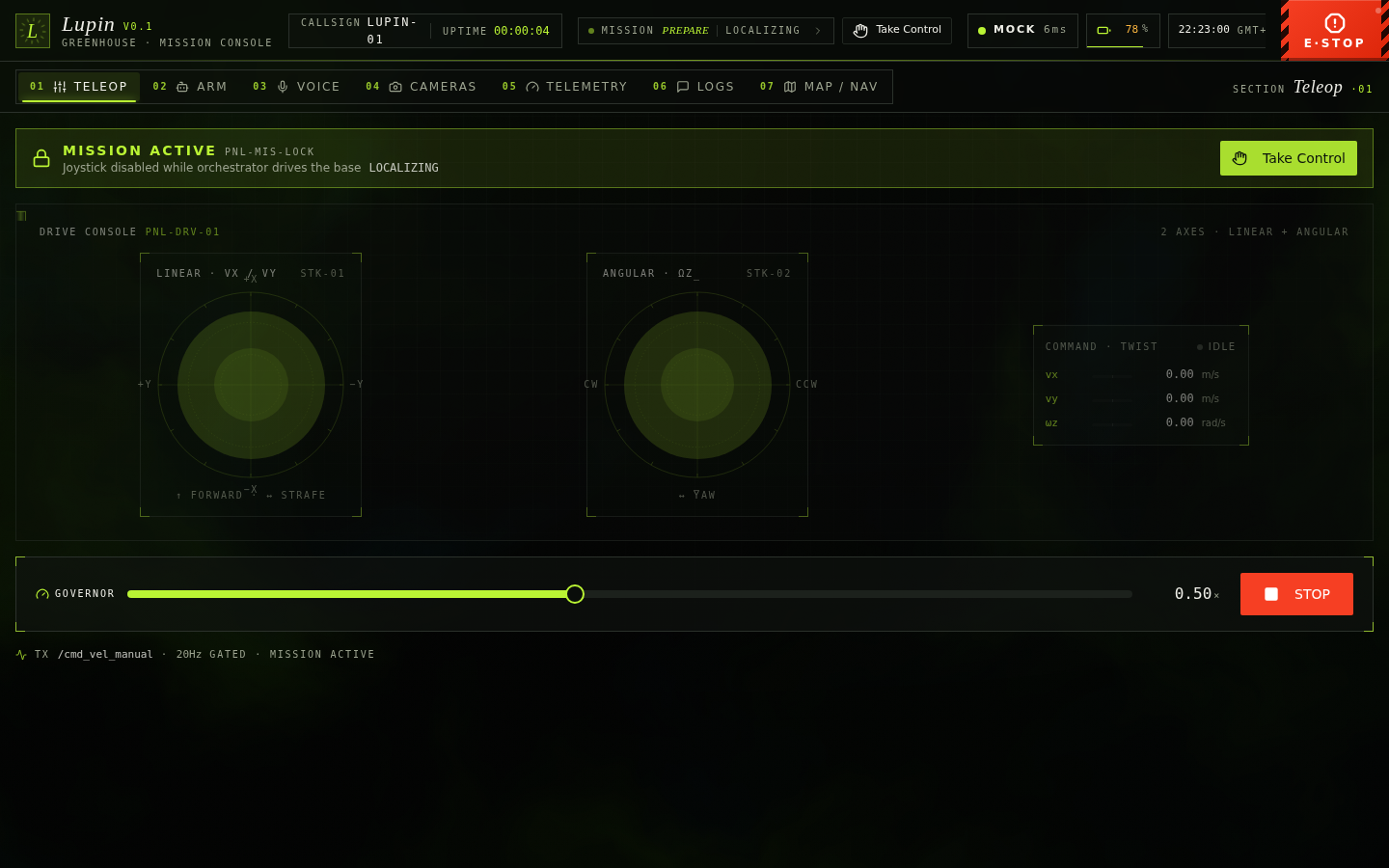
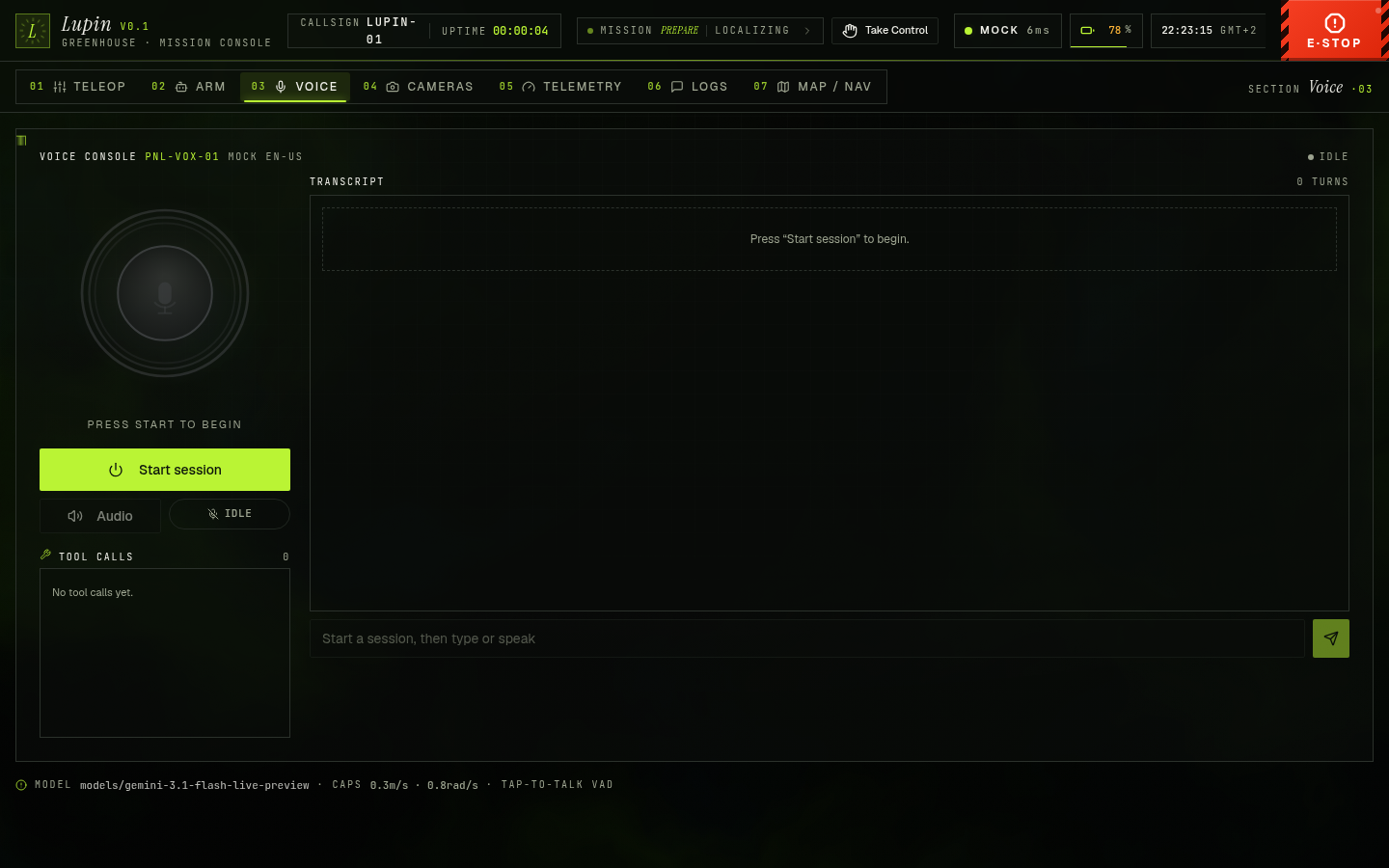
The console is built around one rule, depth-as-information, telemetry-as-motion. A living WebGL aurora drifts behind solid instrument panels and shifts mood with the robot's state, calm when idle, brighter while a mission runs, a slow red wash on E-stop. Motion only happens when ROS data changes or the operator acts, nothing animates for decoration's sake.
Signature systems
- Living WebGL aurora, a single full-screen fbm shader (react-three-fiber) drifts chartreuse↔cyan behind everything, tinted by connection / mission / E-stop state. A fixed dark scrim keeps text contrast deterministic, it clamps DPR, pauses when the tab is hidden, and falls back to a pure-CSS gradient under
prefers-reduced-motionor without WebGL. - Live 3D digital twin, a procedural mecanum rover + 4-DOF arm (no model download, offline-safe for AP-mode demos) driven by the same
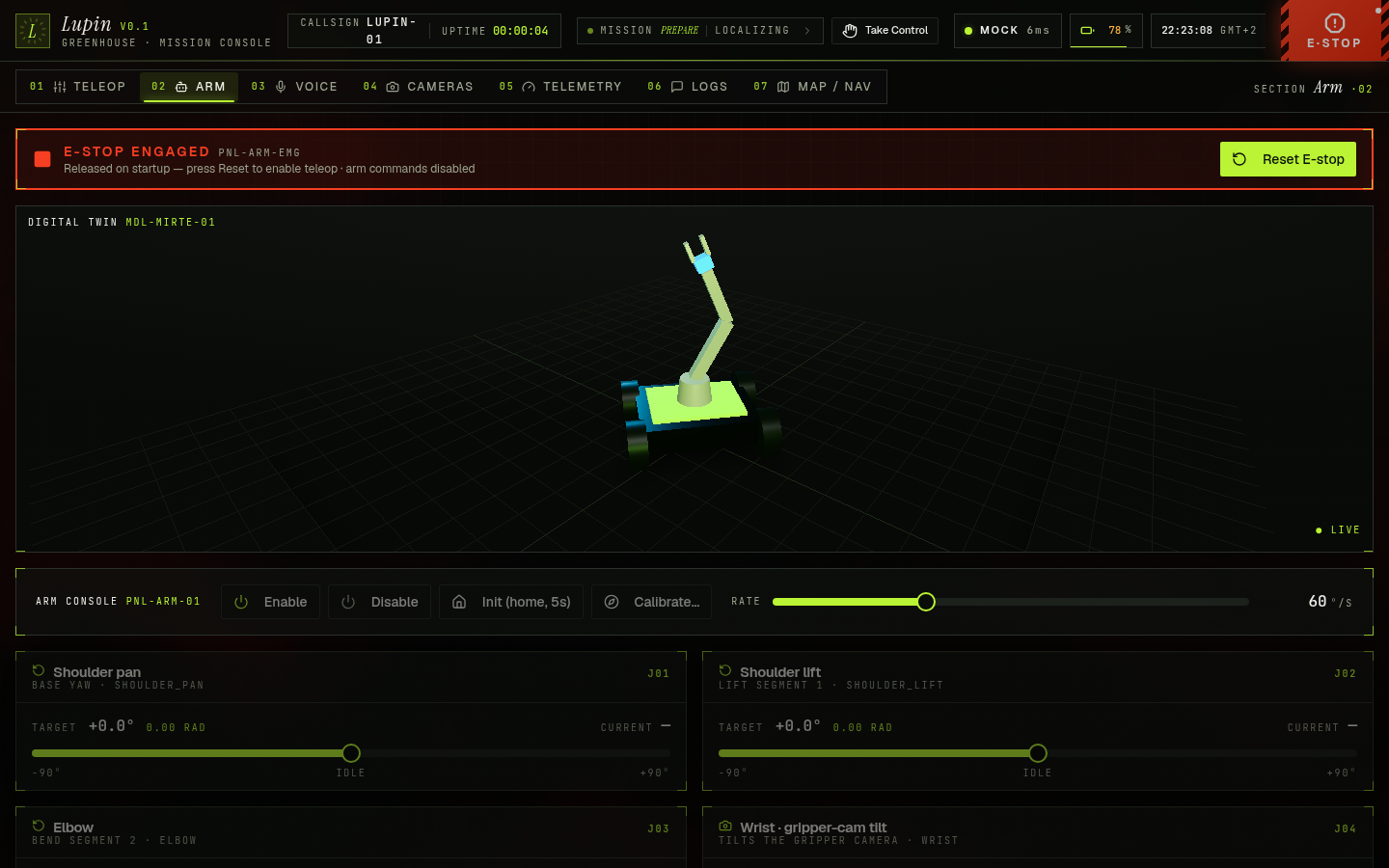
/joint_statesand/mirte_base_controller/odomthe 2D widgets read, so 2D and 3D never disagree. It flags STALE if telemetry goes silent, the documented rosbridge silent-wedge tell. - Cinematic boot handshake, a power-on sequence whose log advances off real rosbridge milestones (link → handshake → telemetry → live), shown once per session, always skippable, with a failsafe watchdog so a wedged link never traps the operator.
- Telemetry-as-motion, battery, voltage and joint readouts roll on springs into fixed-width
tabular-numsslots and flash on meaningful change, the battery ring shifts chartreuse → amber → red across thresholds. High-rate streams (/cmd_vel, raw IMU) are shown raw, never spring-smoothed. - Glass on overlays only, frosted glass is reserved for floating Radix surfaces (settings, dialogs, tooltips), always-on instrument tiles stay solid for legibility.
Built for every screen
The layout holds from a 390 px phone to a 1920 px wall console, the tab bar collapses to icons, panels reflow to a single column, and the 3D twin renders even on mobile.
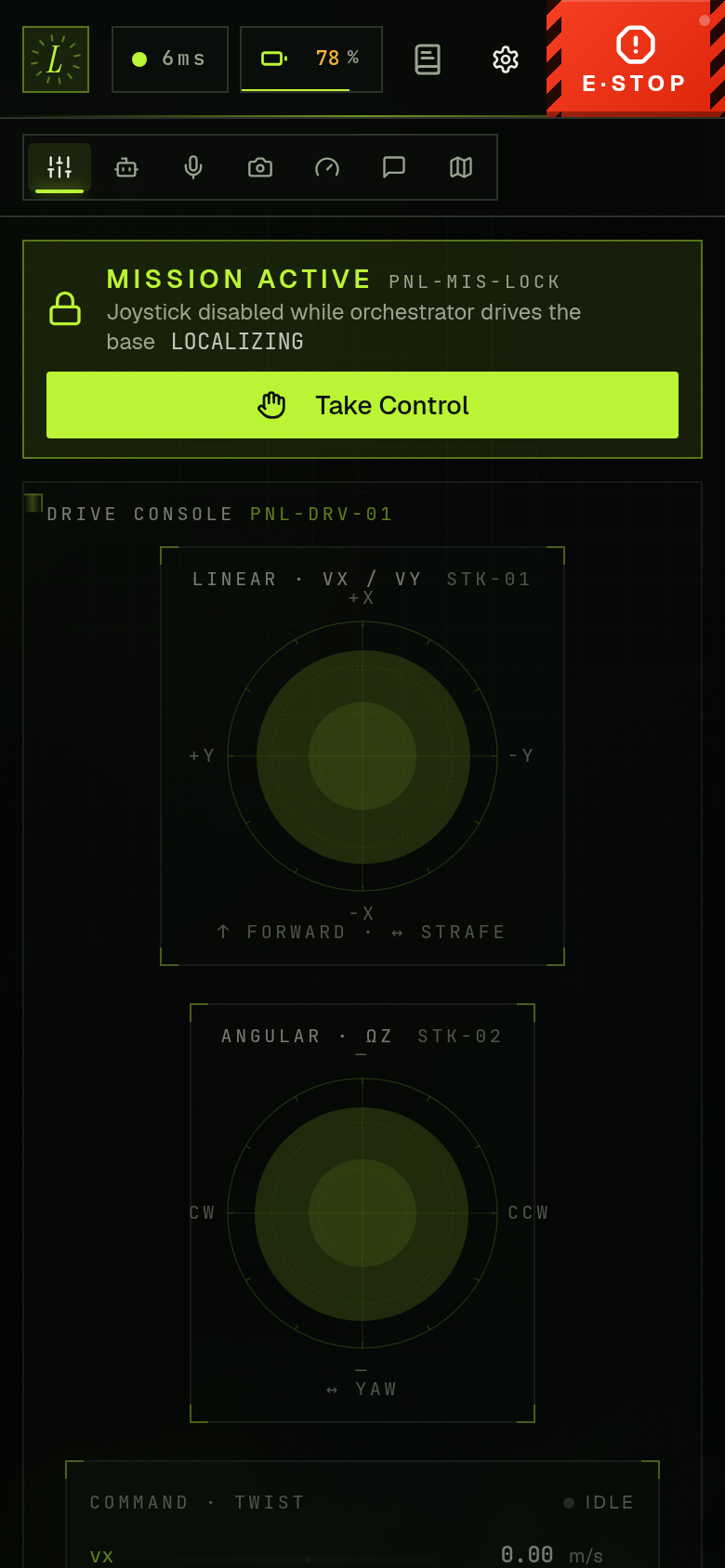
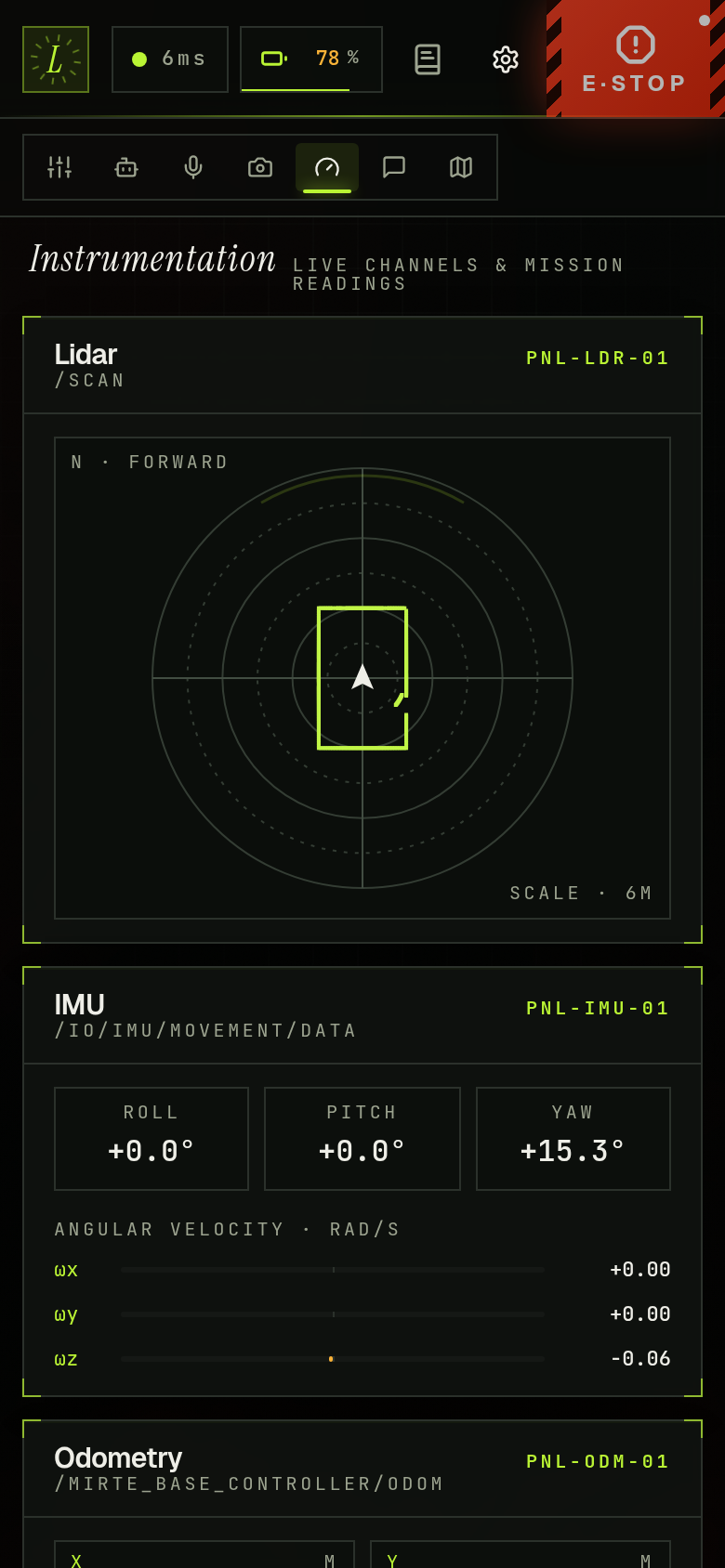
Every effect honours prefers-reduced-motion and prefers-reduced-transparency, animations freeze to a single frame and glass drops to solid, but information is never removed, handshake status, live values, and state changes still read.
The rosbridge-only data plane
The browser is a pure consumer. It opens one WebSocket to rosbridge_websocket, subscribes to the topics each tab needs, and dispatches every command as a rosbridge publish or service call. The one stream that does not ride ROS is the voice link, which goes straight from the browser to Google's Gemini Live API.
The frontend defaults its rosbridge URL to the same-origin proxy path ws(s)://<host>/_ros (which Vite forwards to localhost:9090), and the MJPEG stream to /_video. Routing both through the same Vite origin means one TLS cert covers the page, the socket, and the video, no mixed-content warnings, no second certificate. The Settings drawer overrides the rosbridge URL and every topic name, persisting to localStorage.
Reconnect and the latched-topic caveat
RosProvider owns the connection lifecycle. On a drop it reconnects with exponential backoff from 500 ms to a 5 s ceiling, and it pings /rosapi/get_time every 2 s to populate the latency pill, the round-trip is the number behind the connection badge. The deeper subtlety is durability, roslib.js exposes no QoS API, so every web subscription is effectively VOLATILE even when the Lupin publisher is TRANSIENT_LOCAL. Latched state topics like /twin/state, /tf_static, and /e_stop_state are read correctly only because their producers also republish at roughly 1 Hz, a late-joining browser converges within a second rather than on the next genuine edge. This is the mechanism behind every "STALE" badge, and the reason anything that needs the current latched value immediately pulls it through a service call instead of leaning on subscription durability.
Ports and processes
lupin_web.launch.py spawns up to five processes, three serve the page and bus, two are co-located helpers the HMI cards and voice tools call:
| Port / role | Process | Why |
|---|---|---|
8090 UI | Vite (npm run preview / dev) | Serves the SPA. Chosen to dodge :80 (course UI), :8080 (wifi-connect AP captive portal), :9090 (rosbridge). |
8091 MJPEG | web_video_server (lupin_web_video_server) | LAN-reachable MJPEG on 0.0.0.0 for the Cameras tab. Vendor's instance stays localhost-only. |
9090 bus | rosbridge_websocket | JSON/CBOR broker the browser connects to. |
| LED service | light_strip_bridge | Serves /lupin/leds/set + /lupin/leds/auto so the Map tab's LightControl card can drive the status strip. In auto mode it mirrors /mission/state, and when no mission owns the strip it shows live drive/arm/standby/e-stop activity. |
| Arm library | arm_library_server | Owns ~/.config/lupin/arm_library.json and serves /lupin/arm/library/* for the Pose Library + Sequence Recorder cards and the voice arm tools. |
The seven tabs
A persistent top bar (logo, rosbridge pill, battery pill, clock, settings gear, and the permanent E-STOP) wraps seven tabs, numbered 01 to 07 in App.tsx:
- Teleop (
01), two virtual joysticks (left = linear x/y, right = angular z), live Twist readout, speed-scale slider, mirrored stop button. Publishes tocmdVelTopicat 20 Hz while a stick is active. See Teleop & manual control. - Arm (
02), per-joint sliders for the 4-DOF Hiwonder arm (shoulder pan/lift, elbow, wrist) plus the gripper jaw, a strict arming gate, the Pose Library and Sequence Recorder, and operator-in-the-loop calibration. See The arm tab below. - Voice (
03), push-to-talk console wired to Google's Gemini Live API. See Voice agent below. - Cameras (
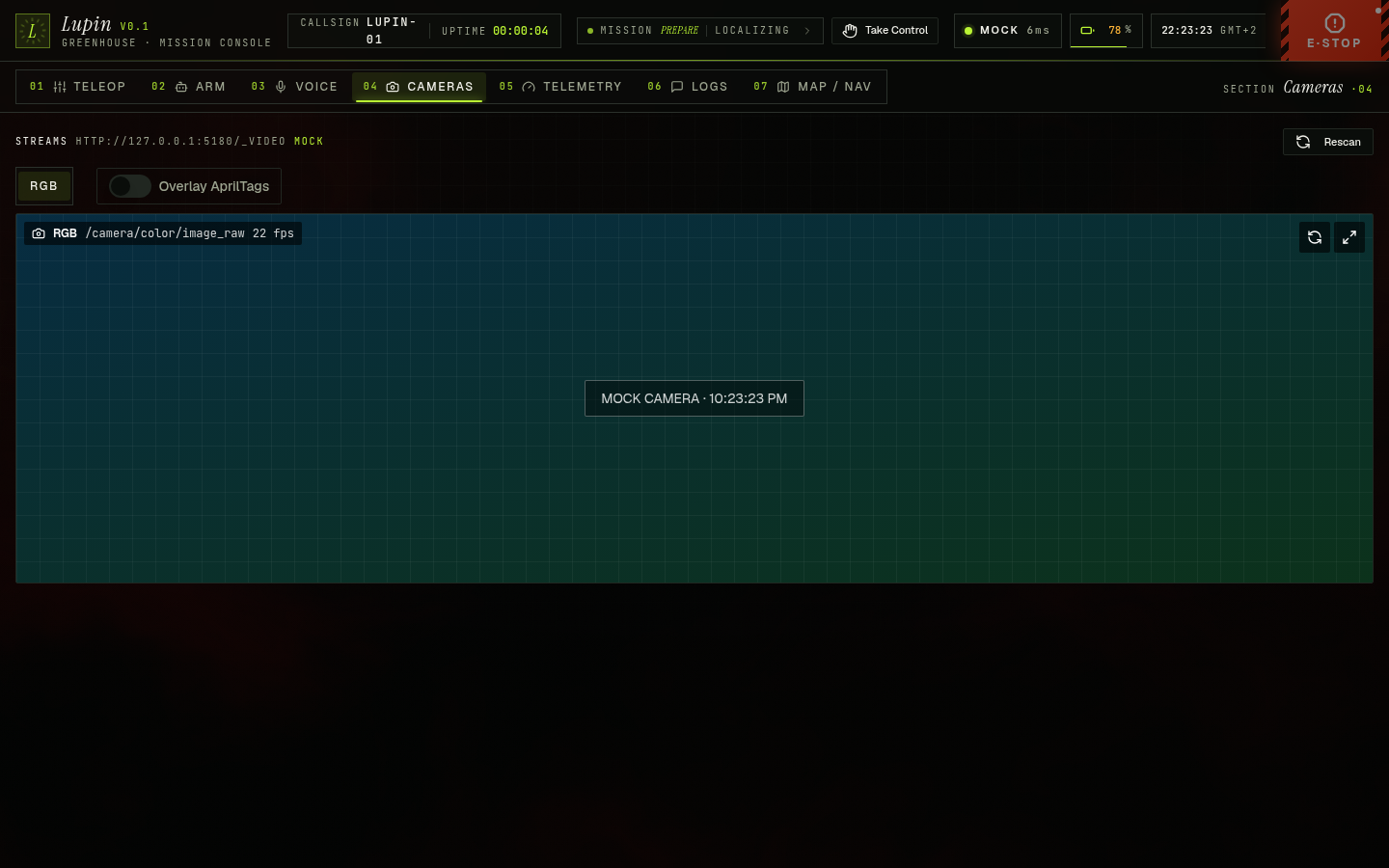
04), MJPEG stream pulled fromweb_video_server's/stream?topic=endpoint, with the AprilTag overlay. See The AprilTag overlay below. - Telemetry (
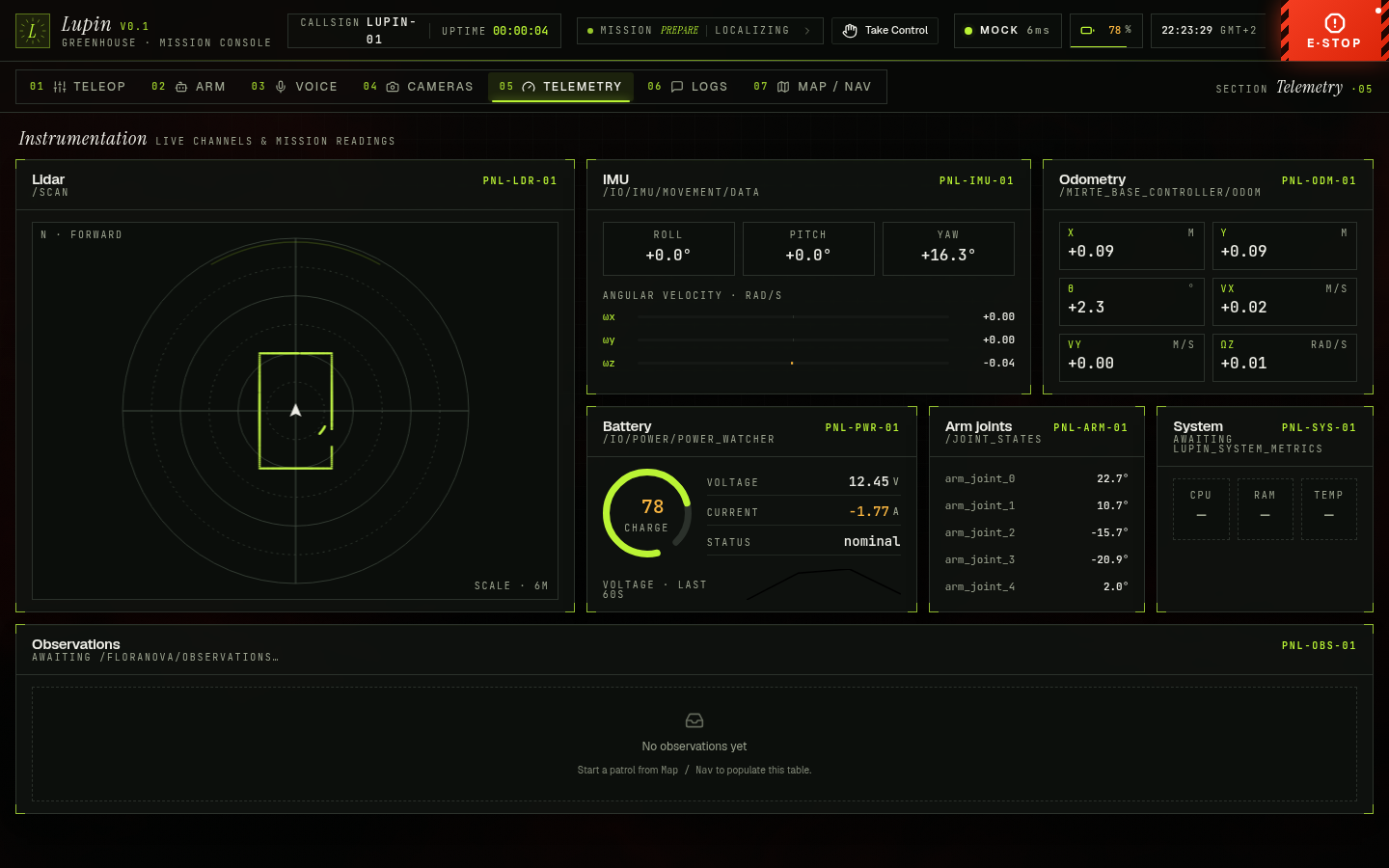
05), top-down Lidar canvas (/scan), IMU (/io/imu/movement/data), Odometry (/mirte_base_controller/odom), Battery + voltage sparkline (/io/power/power_watcher), and arm joints (/joint_states). - Logs (
06), live/rosouttail (rcl_interfaces/msg/Log) with severity filter, node filter, search, pause/clear, capped at 500 rows. - Map / Nav (
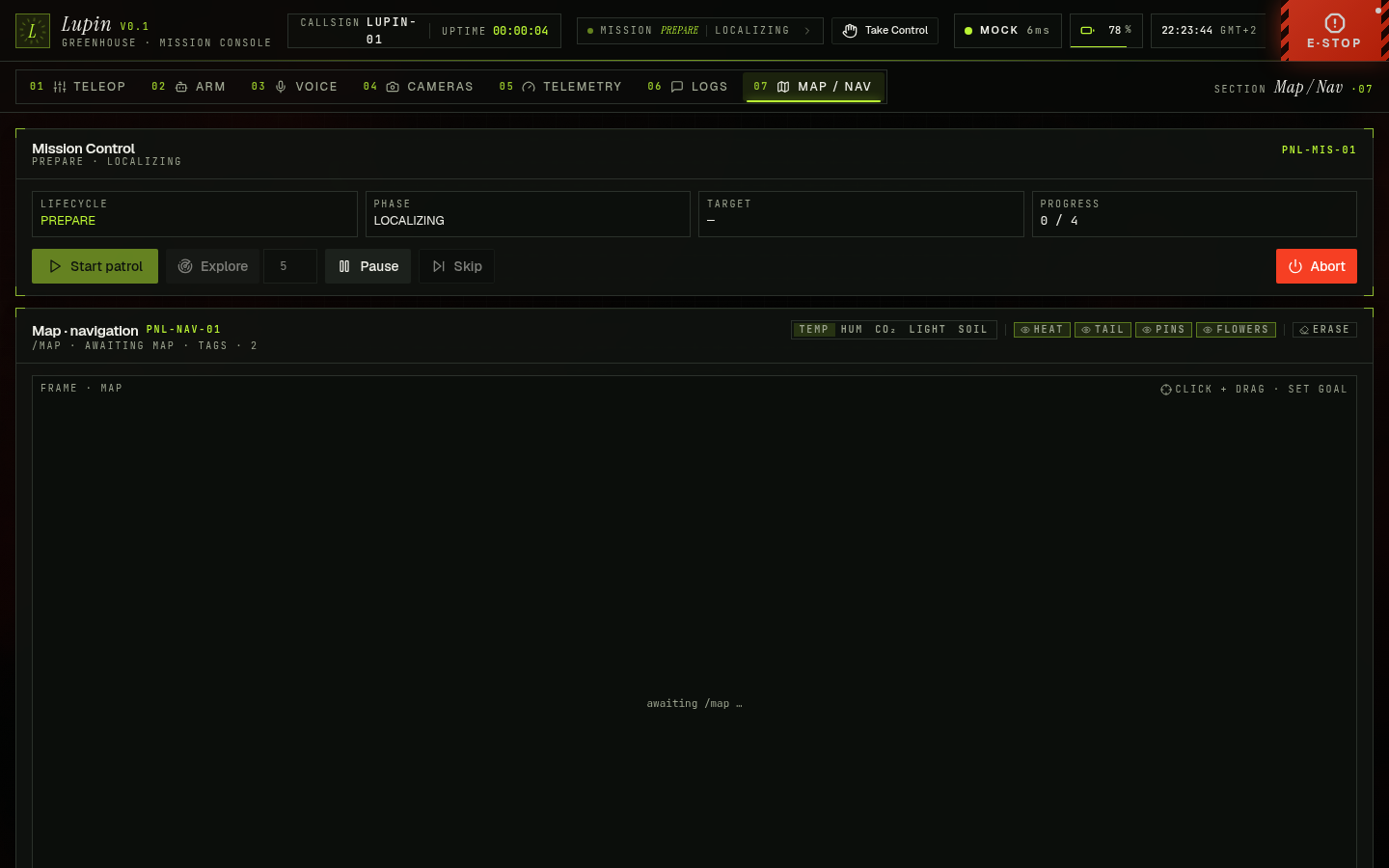
07), live SLAM grid (/map), browser-computed robot pose, the latest Nav2/planas a chartreuse polyline, click-and-drag to publish ageometry_msgs/msg/PoseStampedto/goal_pose, twin-driven tag pins and flower rings, the LightControl card, and Mission Controls (Start exploration, pause/resume/abort/skip). See Mission orchestrator.
The HMI publishes drive commands to /cmd_vel_manual (the default cmdVelTopic), the manual input of twist_mux (priority 50), not the controller directly. Routing through the mux is what lets manual driving and Nav2 share the bus without racing. The full arbitration table lives in Teleop & manual control.
Telemetry topics use the robot's real names
The default topics in settings.ts target the topics that actually have publishers on the real Mirte, not the canonical aliases:
| What | Subscribed topic | Why not the obvious name |
|---|---|---|
| IMU | /io/imu/movement/data | /imu/data has no publisher on the real robot. |
| Battery | /io/power/power_watcher | /battery_state is advertised but never published. |
LED control
The Map tab also carries the LightControl card, the operator's hold on the status strip. It has two modes. In auto it hands the strip back to light_strip_bridge, which paints the colour for each /mission/state phase and, whenever no mission owns the strip, fills the gap with live activity so the robot is never doing something silently: green-blink while driving (any source, the twist_mux output covers teleop, HMI joystick and Nav2 alike), orange-blink while the arm or gripper moves, and solid blue on standby, a render loop toggling the blink at 1 Hz. The mission palette still wins while a run is in progress, so the activity layer only surfaces outside a mission. In manual it calls /lupin/leds/set (mirte_msgs/srv/SetNeopixel) to pin a colour from the preset swatches, which mirror the bridge's auto palette so a manual pick reads the same as the state it stands for, and /lupin/leds/auto (std_srvs/srv/Trigger) hands control back. The one thing the card cannot override is safety, E-stop and FAULT still force red on the robot regardless of a manual hold, the bridge enforces that (it subscribes /e_stop_state directly, so that red holds in every mode, even standalone teleop with no mission running) and the UI only reflects intent. On Mirte-247264 the strip is wired BRG, so the bridge carries a color_order: 'BRG' param to remap the bytes, the HMI palette shows true colours. See Green shows red. The same two services back the voice set_light tool, so "make the lights blue" or "put the lights back to auto" drive the identical manual/auto path as the card.

Browser-side TF tree walking
ROS 2 has no tf2_web_republisher and ROSLIB.TFClient cannot follow the graph, so the HMI computes the robot's map-frame pose itself. useMapPose subscribes to /tf and /tf_static (tf2_msgs/msg/TFMessage) with CBOR binary compression and throttle_rate: 100, builds a frame dictionary, and on a 100 ms timer calls composeChain to walk from base_link up to map. Each hop is a 2D pose composition (quaternion-to-yaw, then a planar rotate-and-translate), guarded by a 32-hop cycle limit so a malformed tree can never spin. The result re-renders only when the pose moves more than 5 mm or 0.005 rad, which collapses a 50+ Hz /tf flood into a render rate the map view can actually use. The same composed pose backs the voice save_named_location, nav_forward, and rotate tools.
The CBOR and throttle_rate choices are deliberate, and they target a specific failure mode. /tf is the single biggest contributor to the rosbridge silent wedge on the Orange Pi, because JSON-encoding a high-rate transform flood pins the Pi-side encoder. Throttling to 10 Hz and switching the wire format to binary keeps that encode cost off the robot, the Pi never has to round-trip those floats through JSON.stringify.
The permanent software E-stop
The E-stop is permanent UI furniture, not a button, a red full-height bar on every screen. It boots engaged (reason startup), nothing drives until the operator clears it, and reset is always manual. What makes it a real safety control, rather than a teleop convenience, is that a single trigger now fans out across two independent layers.
Layer 1 lives in the browser and stops teleop instantly. While active, useCmdVel (the only sanctioned Twist path) gates every publish, and a 20 Hz zero-Twist heartbeat goes out on /cmd_vel_manual so the gate owns the drive bus. On a BEST_EFFORT cmd_vel bus the heartbeat alone would lose the race against Nav2's velocity smoother, so each trigger also fire-and-forgets action_msgs/srv/CancelGoal (the zero-UUID cancel-all) at both Nav2 servers, /navigate_to_pose/_action/cancel_goal and /navigate_through_poses/_action/cancel_goal. Cancelling the goal is what actually silences Nav2, then the zero heartbeats own the topic uncontested. The bar auto-trips on beforeunload and rosbridge disconnect always, and on tab-hide / window-blur when estopAutoOnFocusLoss is on (default true).
Layer 2 reaches the autonomous FSM, which the client gate cannot. The bar publishes its state on /lupin/hmi/estop (std_msgs/Bool, republished at 2 Hz for late subscribers). On the robot, estop_bridge ORs that soft-stop with the physical button /io/intensity/emergency_button/digital (mirte_msgs/IntensityDigital) and republishes the result on /e_stop_state (std_msgs/Bool) at 5 Hz. The mission orchestrator's EStopMonitor and the LED safety override both consume /e_stop_state, so HMI STOP now freezes the autonomous mission, cancels the in-flight Nav2 goal at the FSM level, and forces the status strip red, not just the local teleop gate. This closes the audit's number-one safety gap, the E-stop wired to nothing story, where /e_stop_state had a consumer but no producer in production.
There is still no hardware kill switch in this path. Both layers are software, the bar gates a rosbridge cmd_vel channel and the bridge is a normal ROS node. It is a safe-by-default operator control wired into the orchestrator, not a safety-rated interlock. The button's engaged_value polarity param is logged loudly at estop_bridge startup precisely because it is not yet hardware-verified, press the real button and confirm /e_stop_state goes true.
Because the engaged bar heartbeats zeros through twist_mux at 20 Hz (priority 50), an open HMI tab can silently out-vote a raw terminal cmd_vel publish. With estopAutoOnFocusLoss on, alt-tabbing to a terminal also re-latches the bar via window-blur, so a "raw drive test" fails for reasons that look like dead motors. Click Reset E-stop first, and isolate the motor layer (priority-100 /cmd_vel_joy, wheels by hand) before blaming the HMI. See The HMI that silently blocks every drive path.
The arm tab
The Arm tab commands the 4-DOF Hiwonder arm plus the gripper jaw, and almost every interesting decision here is about not moving the arm by accident.
The strict arming gate
Servo torque is both the arm power state and the slider arming gate, and it is unknown on every mount, including the in-app tab-switch remount, because Radix unmounts the inactive tab. The gate is deliberately strict, torque !== true blocks the sliders, the nudge buttons, and the Home button, so a tab-return can never silently re-arm a freshly-seeded slider. Enable is a real arming switch, calling /lupin/arm/set_torque (std_srvs/srv/SetBool), not the raw enable_all_servos that toggles torque while the HW interface keeps re-asserting its setpoint. Until the operator first grabs a slider, the thumb tracks the live pose from /joint_states, so the first touch never lurches the arm from a phantom zero.
Convergence-based acknowledgement
A slider's status badge does not say "settled" because the RPC returned, it says so because /joint_states converged within tolerance inside the expected travel time. Each send computes an expectedMs from the joint displacement over the slew rate plus slack, the gripper uses a fixed 2.5 s because GripperCommand ignores rate and drives to a force-limited grasp. If the joint never arrives, the badge flips to stalled, which is how the UI surfaces a silently-rejected servo angle or a Hiwonder thermal/effort trip, the shoulder_lift servo cooking itself against gravity shows up here as a stall rather than a fake ack.
One source of truth for the joint limits
The per-joint windows are not magic numbers scattered across files, they live once in lib/arm.ts and are mirrored, in radians, by lupin_hmi/arm_limits.py, the two are asserted consistent at runtime across the JS/Python seam. Each window is the intersection of the real Hiwonder servo software limit and the ±90° URDF/bridge envelope, rounded inward so a slider can never request a pose the servo rejects:
| Joint | Real servo limit | Command window | Note |
|---|---|---|---|
shoulder_pan | -86.0° … +90.0° | -86° … +90° | full reach kept |
shoulder_lift | -86.2° … +85.5° | -86° … +85° | tightened both ends |
elbow | -116.3° … +92.5° | -90° … +90° | deliberate under-travel |
wrist | -110.7° … +88.0° | -90° … +88° | URDF floor, servo ceiling |
gripper | -43.6° … +37.0° | -30° … +30° | conservative, range unverified |
The gripper degree axis is inverted on Mirte-247264, -30° is OPEN and +30° is CLOSED, and the ±30° window is still a conservative guess against the unverified mechanical stops (hence the loud "range unverified" badge). Any semantic open/close consumer, including the voice gripper tool, must respect that sign. See the gripper command path war story.
Arm pose & sequence library
Beyond the five built-in presets (home, zero, tuck, pick, place, served by the onboard arm_preset_server), the Arm tab carries a full pose and sequence library, owned laptop-side by arm_library_server against ~/.config/lupin/arm_library.json. The Pose Library card snapshots the arm's current joint positions under a name and replays them later, the Sequence Recorder card records and replays motion sequences. Recording has two modes, teleop keeps torque on so you jog the arm via the sliders, kinesthetic drops torque so the arm goes limp and you hand-guide it. Every card calls the /lupin/arm/library/{save_pose,goto_pose,play,record,stop,list,state} services, and the /lupin/arm/library/state topic drives a libraryBusy flag that freezes the per-joint sliders while a record or replay is in flight, so manual input cannot fight a running sequence. The library cards gate on connection and E-stop only, not the arming switch, precisely because kinesthetic recording needs torque off.

Kinesthetic recording drops torque, the arm sags free under gravity the instant you start. Support the arm by hand before recording, and never park it extended between sessions, the shoulder_lift servo is torque-marginal lifting against gravity.
The AprilTag camera overlay
The Cameras tab pulls MJPEG from web_video_server's /stream?topic= endpoint, not a direct rosbridge subscription, because the browser cannot decode raw image topics at frame rate. The AprilTag overlay is a separate requestAnimationFrame canvas loop that subscribes to /camera/tag_detections_json (std_msgs/msg/String, a JSON array of {id, corners[4][2], dist} packed by lupin_perception/tag_annotator) and draws green corner boxes, the tag ID, and the range over the live stream. The toggle persists in sessionStorage.

The overlay canvas is hard-coded to 640x480, the Gazebo camera matrix the detection corners are expressed in. Corner coordinates only line up with the stream at that resolution, point the overlay at a camera publishing a different size and the boxes drift off the tags. Treat the overlay as a sim/calibrated-resolution aid, not a universal one.
Voice agent
The Voice tab opens a single bidirectional WebSocket from the browser directly to Google's Gemini Live API (geminiModel default models/gemini-3.1-flash-live-preview). One stream carries 16 kHz mono PCM-16 mic audio in, and the model's voice, transcripts, and native function calls back, there is no separate STT/LLM/TTS pipeline.
Manual VAD turn-taking
The deep mechanism here is who decides a turn is over. The HMI disables Gemini's server-side automaticActivityDetection and the client owns the turn boundaries, a browser SpeechEndpointer (lib/voice/vad.ts) fires activityStart when speech begins and activityEnd on an RMS-silence hold (or on push-to-talk release). The reason is latency, double-gating the turn, the client closing the mic on silence and the server waiting for its own silence timeout, added roughly 800 ms and stranded responses until the next button press. With one authority over the boundary, the turn commits the instant the client says so. A companion fix is the eager AudioContext resume, the output player is created and resumed inside the user gesture that starts the session, so the first model chunk never hits a suspended-context hang.
The model is given a 23-tool function-calling surface, declared at session start in web/src/lib/voice/tools.ts (the ROBOT_TOOL_DECLARATIONS array and the ToolName union both carry 23 entries) and dispatched in web/src/lib/voice/session.tsx against the live ROS and E-stop providers. Grouped by domain:
The surface splits into drive bursts, Nav2-mediated motion, arm presets and the pose/sequence library, the gripper, the status light, and safety/IO. Highlights of the dispatch:
| Tool | Purpose |
|---|---|
drive | Short Twist burst (linear_x/y, angular_z), duration_s clamped to [0.1, 2.0], auto-zeroes after the duration. |
stop | Publish a zero Twist immediately. Always safe. |
nav_goto | Nav2 goal at absolute map-frame x, y, yaw via /goal_pose. |
nav_forward | Body-frame offset (forward_m, lateral_m, rotate_deg), HMI reads map→base TF, rotates, sends the absolute goal. Needs localization. |
rotate | Rotate in place by a relative angle_deg using the Nav2 planner. Needs localization. |
nav_goto_named / save_named_location / list_named_locations | Navigate to / snapshot / list map-frame named locations. |
nav_cancel | Cancel any in-flight Nav2 goal (idempotent). Does not stop teleop. |
arm_preset | Move the arm to a built-in preset (home/zero/tuck/pick/place) via /lupin/arm/preset (lupin_msgs/srv/SetArmPreset). |
arm_goto_pose | Move to an operator-saved pose via /lupin/arm/library/goto_pose (distinct from arm_preset's built-ins). |
arm_save_pose / arm_list_library | Snapshot the current pose into / list the arm library. |
arm_run_sequence / arm_stop | Replay a saved sequence (speed 0.25 to 2.0) / abort a replay or recording. |
arm_record | Record a sequence, mode='teleop' (torque on) or mode='kinesthetic' (torque off, hand-guided). |
gripper | Move the jaw, open / close / set to a percent (conservative ±30°, inverted). |
calibrate_arm | Operator-in-the-loop Hiwonder zero-offset calibration, start / commit / cancel / status. Hardware-only. |
set_speed_cap | In-memory multiplier in [0, 1] on the voiceMax* limits for this session. |
query_state | Read-only, fetch pose, battery, estop. Never moves the robot. |
engage_estop | Trigger the software E-stop (reason voice-agent), reset stays manual. |
speak | Push text into the transcript with no motion or audio. |
set_light | Pin the status strip to a named palette colour via mirte_msgs/srv/SetNeopixel (/lupin/leds/set), or mode:'auto' → std_srvs/srv/Trigger (/lupin/leds/auto). Cosmetic, not e-stop gated. |
The voice dispatch safety envelope
Every motion-producing tool funnels through the same estop.active check and the same saturating speed caps as the joystick. When the bar is engaged, those calls return ok:false with a blocked flag, and the system prompt tells the model not to retry. drive is additionally clamped per-call to voiceMaxLinearMps / voiceMaxAngularRps (defaults 0.3 m/s / 0.8 rad/s), with the set_speed_cap multiplier on top, so the agent physically cannot exceed those limits or move while the bar is engaged. The exception is deliberate, calibrate_arm and arm_record gate on E-stop only for start, because cancel and status must keep working while e-stopped so the operator can recover a stranded calibration or recording session. The relative-nav tools carry one more sign rule, nav_forward and rotate flip the body-frame offset sign when polarityInvertHmi is on, the same flip the joystick and map-click goals get.
Tools without a real backend are deliberately not declared. A tool that always errors trains the model to stop calling it, one that silently succeeds trains it to hallucinate. So scan_apriltags, detect_flowers, and record_observation stay absent until their services exist. See Perception for what is and is not wired.
Calibration safety prompt
The calibrate_arm tool is hard-prompted to never call action='commit' in the same turn as start. start disables the servos and the arm goes limp for hand-posing, committing immediately would write zero offsets to whatever pose the arm happened to fall into. The model must wait for an explicit operator utterance ("go ahead", "commit", "I've moved the arm") before committing.
Setup
aistudio.google.com (the free tier is enough for a demo).localStorage only.voiceMax* caps, and push-to-talk vs open-mic.The API key is sent as a ?key= query parameter on the WebSocket, the browser holds the secret. This is acceptable only on a LAN-only demo. Do not expose this UI on the public internet without first wiring the ephemeral-token broker (Google's auth_tokens.create is the supported path).
The voice tab needs a secure context for the mic API, so on the robot the HMI must be served over HTTPS (tls:=true). On localhost (sim/dev) plain HTTP already counts as secure, so tls stays false.
Offline mock mode
Append ?mock=1 to the URL (or run npm run dev -- --mode mock) and RosProvider swaps in synthetic per-message-type generators while the Voice tab runs a scripted session that still exercises real tool dispatch. All seven tabs work with no robot attached, a clean walkthrough in mock mode is the bar for "demoable", and a missing Gemini key drops the Voice tab into the same harness.
The mock is faithful, not stubbed, for two reasons. Subscribe rates match the real node tick rates, MissionState at 5 Hz, TwinState at 1 Hz, IMU at 50 Hz, so the cockpit animates exactly as it would live. And service responses are type-aware, mockServiceResponse switches on the service type, SetNeopixel returns {status: true} (not success) so LightControl reads a manual set as OK, Trigger returns an empty message on purpose so each consumer falls back to its own label, and CalibrateArm walks a real AWAITING_POSE → IDLE state machine with synthetic per-joint diffs. A generic {success: true} for everything would break any consumer that inspects a typed field.
Hardware polarity
Mirte-247264's mecanum drive was originally wired with motor and encoder leads reversed in pairs, which rotated the vendor cmd_vel frame 180° about Z. That inversion was fixed at the source (telemetrix p1/p2 + encoder A/B pin-swap), so the drive frame now matches the physical chassis and polarityInvertHmi defaults false everywhere, a stale persisted true from an older install is dropped on load. The setting survives only as an escape hatch, turning it on flips the joystick and voice cmd_vel, map-click goals, the nav_forward / rotate body-frame offsets, and the map view 180° about Z at the human-facing surface only, leaving the internal Nav2/SLAM frame untouched. There are no sign hacks downstream of this single setting. See Backwards robot, right-looking map.
Running it
The HMI ships inside lupin_bringup, one laptop command brings up Nav2, SLAM, RViz, and the HMI (on by default, pass web:=false to skip it). To run the console on its own, use the package launch directly:
# Co-located rosbridge + LAN video + LED + arm-library, plain HTTP on localhost
ros2 launch lupin_web lupin_web.launch.py
# or with hot-reload
ros2 launch lupin_web lupin_web.launch.py mode:=dev
In sim the default drive topic must be re-pointed once, open Settings and set cmdVelTopic to the simulator's controller input, and turn polarityInvertHmi off.
# Defer to the vendor/onboard instances, keep raw frames on the Pi, serve HTTPS for the mic
ros2 launch lupin_web lupin_web.launch.py \
  rosbridge:=false \
  video:=false video_target:=http://192.168.42.1:8091 \
  leds:=false arm_library:=false \
  tls:=true
On a robot whose lupin-onboard.service already runs light_strip_bridge, pass leds:=false, two instances collide on the node name and the override services. Browsers warn about the self-signed cert, accept it once per device, then open https://<host>:8090.
The launch arguments:
| Arg | Default | Effect |
|---|---|---|
port | 8090 | UI HTTP/HTTPS port. |
mode | preview | preview serves a built dist/, dev runs the Vite dev server with HMR. |
video | true | Spawn the LAN web_video_server on 0.0.0.0:8091. Set false on the robot (lupin-cameras.service already exposes it). |
video_target | http://localhost:8091 | Where Vite forwards /_video proxy requests, point at the robot on hardware. |
rosbridge | true | Co-locate rosbridge_websocket on :9090. Set false on the robot to defer to the vendor instance and avoid a bind conflict. |
leds | true | Spawn light_strip_bridge so the LightControl card and /mission/state mirroring work. Set false where lupin-onboard.service already runs it (node-name + service collision). |
arm_library | true | Spawn arm_library_server (owner of ~/.config/lupin/arm_library.json). Set false where another instance already runs. |
tls | false | Serve HTTPS with a self-signed cert. Required for the Voice tab on the robot. |
The launch file prints a loud DDS-mode banner. If ROS_DISCOVERY_SERVER is unset, the co-located rosbridge runs in default multicast and will not join the robot's FastDDS discovery graph, the HMI shows LIVE but no battery, no telemetry, and cannot drive. The same requirement applies to the co-located light_strip_bridge, it is a DDS client of the robot's LED service. The fix is to source ~/.config/lupin/ros-env.sh (then the workspace) in the launching terminal and relaunch. The env is per-process, so a healthy ros2 topic list in another terminal will hide this. See LIVE but blind and Networking.
See also
Teleop & manual control
Mission orchestrator
Operations
Interfaces
Greenhouse bridge
The ROS 2 service wrapper around the course mdp-greenhouse simulator, serving per-tag climate readings on demand to the mission stack via GetTagReading, with sentinel-driven debug_mode, a two-clocks split, a MutuallyExclusiveCallbackGroup, three upstream-bug workarounds, and a separately open-sourced lupin_greenhouse_msgs.
Teleop & manual control
Gamepad and web manual control on a priority-arbitrated twist_mux velocity bus with a silent Xbox dead-man, plus the arm_teleop integrator, per-joint slider clamps from arm_limits, the gripper_action_bridge command path and its open-loop JTC re-assert defense, named arm presets, boot-time auto-home controller healing, and the Xbox BLE pairing fix.